
What do the costs in my order details mean? — Markets
1 min read · Updated 27 Oct 2026
What do the costs in my order details mean? — Markets
Every order in Droppery shows a breakdown of the costs. This helps you check your margin and set the right prices in your webshop.
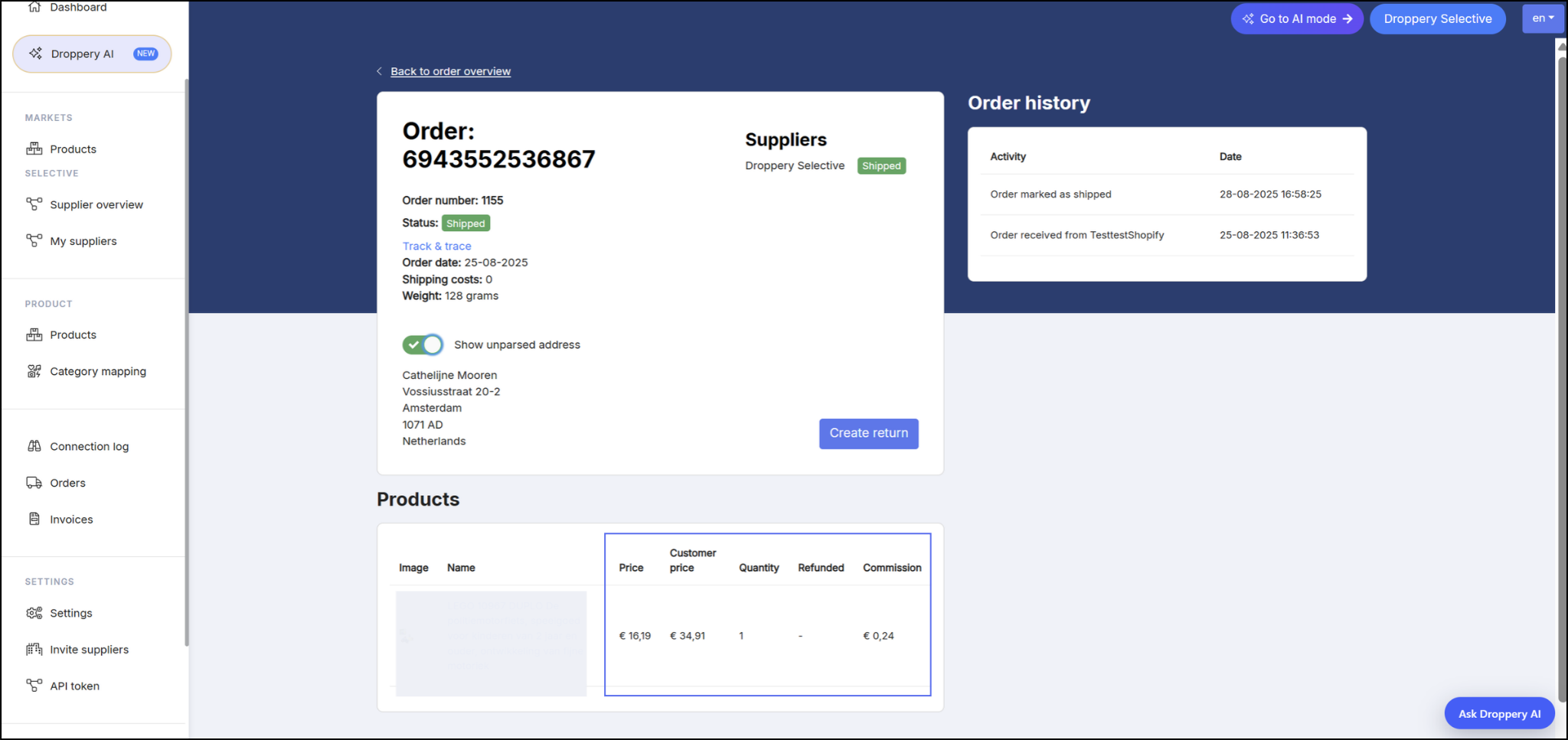
What each field means
- Price is what you pay the supplier for the product.
- Customer price is what your customer paid for the product in your webshop.
- Commission webshop is the commission you pay to Droppery for this item.
Shipping costs
Shipping costs are shown separately in the order details, just below the order numbers. You don't pay commission on shipping costs.
Shipping is calculated per order with fixed pricing. You can check the shipping cost of a product by clicking the red truck icon in the catalog. When an order contains several products from the same supplier, the supplier can often ship them together, so you don't pay shipping twice.
Read more in How to find a product's shipping cost on Droppery Markets.
Working out your margin
- Add up the product price, the shipping costs and the commission.
- Subtract that total from what your customer paid.
- Also take your own VAT and payment processing fees into account.
Want to improve your margin on small orders? Read How to keep small orders profitable on Droppery Markets.
Still have questions?
Ask Droppery AI at help.droppery.ai for an instant answer.
Was this article helpful?
Found a bug or issue while following this article?